Token Exchange
Token Exchange is currently in preview. The API and behavior may change as we continue to refine the feature.
Token exchange allows you to exchange tokens for Civic Auth access tokens, enabling seamless integration between different authentication systems and Civic-powered applications.
Civic Auth supports two token exchange scenarios:
- Civic Token Exchange - Exchange an existing Civic access token for a new token with different scopes or extended validity
- Federated Token Exchange - Exchange tokens from external identity providers (Google, Auth0, Azure AD, etc.) for Civic access tokens
Both flows implement the OAuth 2.0 Token Exchange (RFC 8693) standard.
Use Cases
Best for: Delegating tokens with reduced permissions
- Scope Reduction: Create tokens with fewer permissions for specific tasks or services
- Agent Delegation: Issue constrained tokens to AI agents or automated systems that cannot exceed their granted permissions
- Least Privilege: Follow security best practices by granting only the minimum required access for each operation
Best for: Integrating external identity providers with Civic Auth
- Unified Authentication: Users authenticated with Google, Auth0, or other providers can access Civic-powered services without re-authenticating
- Migration: Gradually migrate users from an existing OAuth provider to Civic Auth
- Enterprise SSO: Integrate with corporate identity providers (Azure AD, Okta) while using Civic for authorization
Configuration
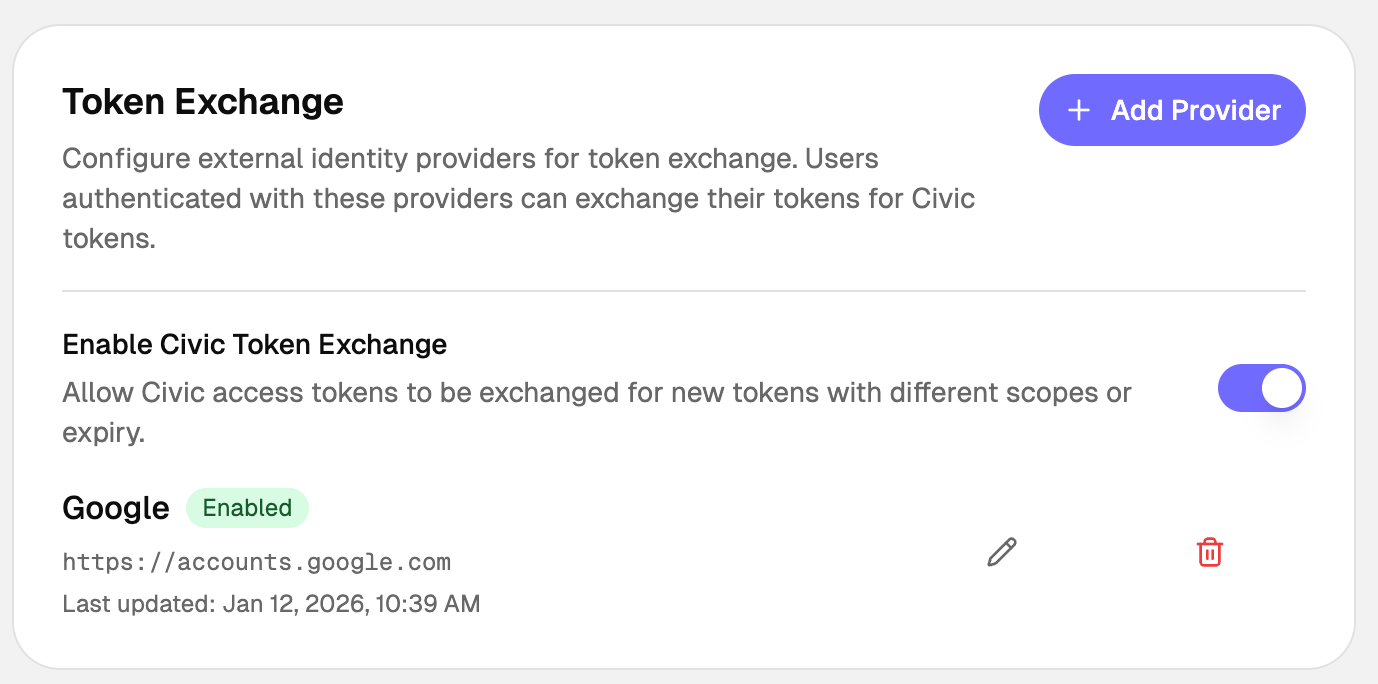
Token Exchange can be set up in the Civic Auth Dashboard under Setup > Token Exchange.
Quick Start
Prerequisites
- A Civic Auth application with client credentials (client ID and secret)
- For federated exchange: An external identity provider configured in the Civic Auth Dashboard
Request Parameters
| Parameter | Required | Description |
|---|---|---|
grant_type | Yes | Must be urn:ietf:params:oauth:grant-type:token-exchange |
client_id | Yes | Your Civic Auth client ID |
client_secret | Yes | Your Civic Auth client secret (or use Basic auth) |
subject_token | Yes | The JWT to exchange (Civic or external) |
subject_token_type | Yes | urn:ietf:params:oauth:token-type:access_token or urn:ietf:params:oauth:token-type:id_token |
scope | No | Space-delimited scopes to request |
expires_in | No | Requested token TTL in seconds |
Basic Token Exchange Request
curl -X POST https://auth.civic.com/oauth/token \
  -H "Content-Type: application/x-www-form-urlencoded" \
  -d "grant_type=urn:ietf:params:oauth:grant-type:token-exchange" \
  -d "client_id=YOUR_CLIENT_ID" \
  -d "client_secret=YOUR_CLIENT_SECRET" \
  -d "subject_token=EXTERNAL_OR_CIVIC_JWT" \
  -d "subject_token_type=urn:ietf:params:oauth:token-type:access_token" \
  -d "scope=openid"
Response
{
  "access_token": "eyJhbGciOiJSUzI1NiIsInR5cCI6IkpXVCJ9...",
  "token_type": "Bearer",
  "expires_in": 3600,
  "scope": "openid profile"
}
Civic Token Exchange
Exchange an existing Civic access token for a new token with different scopes or expiration. The sub claim from the original token is preserved in the exchanged token.
Configuration
Enable Civic Token Exchange by toggling it on in the Dashboard under Setup > Token Exchange.
Example: TypeScript
async function exchangeCivicToken(existingToken: string): Promise<string> {
  const response = await fetch('https://auth.civic.com/oauth/token', {
    method: 'POST',
    headers: {
      'Content-Type': 'application/x-www-form-urlencoded',
    },
    body: new URLSearchParams({
      grant_type: 'urn:ietf:params:oauth:grant-type:token-exchange',
      client_id: process.env.CIVIC_CLIENT_ID!,
      client_secret: process.env.CIVIC_CLIENT_SECRET!,
      subject_token: existingToken,
      subject_token_type: 'urn:ietf:params:oauth:token-type:access_token',
      scope: 'openid profile',
    }),
  });

  const data = await response.json();
  return data.access_token;
}
Federated Token Exchange
Exchange tokens from external identity providers for Civic access tokens. Unlike Civic token exchange, the external user's sub is mapped to a new or existing Civic Auth user, and the resulting token contains the Civic user's sub.
How It Works
sequenceDiagram
    participant App as Your App
    participant IdP as External IdP<br/>(Google, Auth0)
    participant Civic as Civic Auth Server

    App->>IdP: 1. User authenticates
    IdP-->>App: 2. Returns token (access_token or id_token)
    App->>Civic: 3. Exchange external token<br/>POST /oauth/token<br/>subject_token=<external_jwt>
    Civic->>Civic: 4. Validates external token
    Civic->>Civic: 5. Creates/links user account
    Civic-->>App: 6. Returns Civic access_token
Configuration
Add one or more external identity providers in the Dashboard under Setup > Token Exchange > Add Provider. Select a preset (Google, Auth0, Azure AD) or choose Custom, then configure the provider settings:
| Setting | Description |
|---|---|
| Issuer URL | The iss claim value from the external provider's tokens (e.g., https://accounts.google.com) |
| Audience | Expected aud claim value (usually your OAuth client ID at the external provider) |
| JWKS Endpoint | URL to fetch the provider's public keys for signature verification |
| Static Public Key | Alternative to JWKS: paste the provider's public key in PEM format |
| Default Scopes | Scopes to grant in the Civic token (space-separated) |
| Max Token TTL | Maximum token validity in seconds (60-86400) |
Example: React with Google OAuth
Using a Google ID token is recommended for federated exchange — it contains identity claims (email, name, picture) that Civic Auth can map to the new user account.
import { GoogleLogin } from '@react-oauth/google';
import { useState } from 'react';

function LoginButton() {
  const [civicToken, setCivicToken] = useState<string | null>(null);

  return (
    <GoogleLogin
      onSuccess={async (credentialResponse) => {
        // Exchange Google ID token for Civic token
        const response = await fetch('https://auth.civic.com/oauth/token', {
          method: 'POST',
          headers: {
            'Content-Type': 'application/x-www-form-urlencoded',
          },
          body: new URLSearchParams({
            grant_type: 'urn:ietf:params:oauth:grant-type:token-exchange',
            client_id: 'YOUR_CIVIC_CLIENT_ID',
            client_secret: 'YOUR_CIVIC_CLIENT_SECRET',
            subject_token: credentialResponse.credential!,
            subject_token_type: 'urn:ietf:params:oauth:token-type:id_token',
            scope: 'openid email',
          }),
        });

        const { access_token } = await response.json();
        setCivicToken(access_token);
      }}
    />
  );
}
Google ID tokens include claims like email, name, and picture by default. Civic Auth automatically maps these to the user account during federated exchange, so new users are created with their profile information already populated.
Example: Node.js Backend
import express from 'express';

const app = express();
app.use(express.json());

app.post('/api/exchange-token', async (req, res) => {
  const { externalToken, provider } = req.body;

  try {
    const response = await fetch('https://auth.civic.com/oauth/token', {
      method: 'POST',
      headers: {
        'Content-Type': 'application/x-www-form-urlencoded',
        'Authorization': `Basic ${Buffer.from(
          `${process.env.CIVIC_CLIENT_ID}:${process.env.CIVIC_CLIENT_SECRET}`
        ).toString('base64')}`,
      },
      body: new URLSearchParams({
        grant_type: 'urn:ietf:params:oauth:grant-type:token-exchange',
        subject_token: externalToken,
        subject_token_type: 'urn:ietf:params:oauth:token-type:id_token',
        scope: 'openid email profile',
      }),
    });

    if (!response.ok) {
      const error = await response.json();
      return res.status(response.status).json(error);
    }

    const tokens = await response.json();
    res.json(tokens);
  } catch (error) {
    res.status(500).json({ error: 'Token exchange failed' });
  }
});
Provider Configuration Examples
{
  "issuer": "https://accounts.google.com",
  "audience": "1234567890-abc123.apps.googleusercontent.com",
  "jwksUri": "https://www.googleapis.com/oauth2/v3/certs",
  "acceptedAlgorithms": ["RS256"],
  "defaultScopes": "openid email",
  "maxTokenTtl": 3600
}
The audience should be your Google OAuth client ID.
Auth0
{
  "issuer": "https://YOUR_TENANT.auth0.com/",
  "audience": "https://your-api.example.com",
  "jwksUri": "https://YOUR_TENANT.auth0.com/.well-known/jwks.json",
  "acceptedAlgorithms": ["RS256"],
  "defaultScopes": "openid email",
  "maxTokenTtl": 7200
}
Replace YOUR_TENANT with your Auth0 tenant name. The audience should match your Auth0 API identifier.
Azure AD / Microsoft Entra ID
{
  "issuer": "https://login.microsoftonline.com/YOUR_TENANT_ID/v2.0",
  "audience": "api://your-app-id",
  "jwksUri": "https://login.microsoftonline.com/YOUR_TENANT_ID/discovery/v2.0/keys",
  "acceptedAlgorithms": ["RS256"],
  "defaultScopes": "openid email profile",
  "maxTokenTtl": 3600
}
Replace YOUR_TENANT_ID with your Azure AD tenant ID (GUID).
Okta
{
  "issuer": "https://YOUR_DOMAIN.okta.com",
  "audience": "YOUR_CLIENT_ID",
  "jwksUri": "https://YOUR_DOMAIN.okta.com/oauth2/v1/keys",
  "acceptedAlgorithms": ["RS256"],
  "defaultScopes": "openid email profile",
  "maxTokenTtl": 3600
}
Custom Provider
For providers not listed above, you'll need to obtain the following information from your provider's documentation:
- Issuer URL: The value of the
issclaim in tokens issued by the provider - JWKS Endpoint: Usually at
/.well-known/jwks.jsonrelative to the issuer - Token Format: Ensure the provider issues JWTs (access tokens or ID tokens, not opaque tokens)
If your provider doesn't expose a JWKS endpoint, you can use a static public key in PEM format:
-----BEGIN PUBLIC KEY-----
MIIBIjANBgkqhkiG9w0BAQEFAAOCAQ8AMIIBCgKCAQEA...
-----END PUBLIC KEY-----
User Account Linking
When a user performs federated token exchange for the first time, Civic Auth automatically:
- Creates a new user account if no existing account matches the external user
- Links to an existing account if a user with the same verified email exists (when email linking is enabled)
Default Claim Mapping
Civic Auth automatically maps the following claims from the external token to the Civic user account:
| Claim | Type | Description |
|---|---|---|
sub | string | External user ID. Used as the principal identifier for user identity matching. |
email | string | Lowercased. Only mapped if present in the external token. |
email_verified | boolean | Only mapped if present in the external token. |
name | string | Only mapped if present in the external token. |
picture | string | Only mapped if present in the external token. |
The sub claim combined with the provider's issuer URL creates a stable identity mapping, ensuring:
- The same external user always maps to the same Civic account
- Different external users never collide
- Users can link multiple external providers to a single Civic account
API Reference
Token Exchange Endpoint
POST /oauth/token
Content-Type: application/x-www-form-urlencoded
Request Body
| Parameter | Type | Required | Description |
|---|---|---|---|
grant_type | string | Yes | urn:ietf:params:oauth:grant-type:token-exchange |
client_id | string | Yes | Your Civic client ID |
client_secret | string | Yes* | Your Civic client secret |
subject_token | string | Yes | The JWT to exchange |
subject_token_type | string | Yes | urn:ietf:params:oauth:token-type:access_token or urn:ietf:params:oauth:token-type:id_token |
scope | string | No | Space-delimited requested scopes |
expires_in | number | No | Requested token TTL in seconds |
Client secret can alternatively be provided via HTTP Basic authentication header.
Success Response
{
  "access_token": "eyJhbGciOiJSUzI1NiIsInR5cCI6IkpXVCJ9...",
  "token_type": "Bearer",
  "expires_in": 3600,
  "scope": "openid email",
  "refresh_token": "optional_refresh_token"
}
Error Response
{
  "error": "invalid_grant",
  "error_description": "The subject token is invalid or expired"
}
| Error Code | Description |
|---|---|
invalid_request | Missing required parameter |
invalid_client | Client authentication failed |
invalid_grant | Subject token is invalid, expired, or from an unconfigured provider |
unauthorized_client | Client not authorized for token exchange |
unsupported_grant_type | Grant type not supported |
Security Considerations
Token Validation
Civic Auth performs comprehensive validation on all subject tokens:
- Signature Verification: Tokens must be signed by the configured provider's private key
- Issuer Validation: The
issclaim must exactly match the configured issuer URL - Audience Validation: If configured, the
audclaim must match - Expiration Check: Tokens must not be expired
- Algorithm Check: Only configured algorithms are accepted (default: RS256)
Best Practices
Always use HTTPS for token exchange requests
Store client secrets securely; never expose them in client-side code
Request only the token validity you need
Request only the scopes required for your use case
Validate Tokens: Always validate Civic tokens on your backend before trusting claims.
JWKS Caching
Civic Auth caches external provider JWKS for performance and reliability:
- Cache TTL: 1 hour
- Automatic refresh on key rotation
- Graceful fallback during provider outages
Troubleshooting
"Token exchange config not found"
- Ensure the external provider is configured in the Dashboard
- Verify the issuer URL exactly matches the
issclaim in the token
"Signature verification failed"
- Check that the JWKS endpoint is correct and accessible
- Verify the token hasn't been tampered with
- Ensure the provider is using one of the configured algorithms
"Token expired"
- External tokens have their own expiration; exchange them promptly
- Civic tokens respect both the external token's remaining validity and the configured max TTL
"Missing user identifier claim"
- Ensure the external token contains a
subclaim with the user's unique identifier