

https://nexus.civic.com/hub/mcp. Every request to this endpoint must carry a valid access token issued by Civic Auth (auth.civic.com).
How access tokens work
Access tokens are JWTs issued by Civic Auth. Each token is scoped to a specific application (identified by aCLIENT_ID), which determines what a user is allowed to do — which tools they can call, which third-party services they can connect, and what data they can access.
Civic provides its own native app for managing Nexus access (e.g. at nexus.civic.com/web), but third-party applications typically want to manage users within their own product experience.
What you need to do
To connect your application to Nexus with your own user management, you need to complete two steps:1. Create an Organization and link your Client ID
Set up a Civic Nexus Organization and link your existing Civic AuthCLIENT_ID to it. This associates your application’s users with your organization in Nexus, so that access decisions, tool authorizations, and user data are scoped correctly.
Register a Civic Auth application
If you don’t already have one, register at auth.civic.com to get a Client ID and Client Secret.
Create a Nexus Organization
Create an organization at nexus.civic.com.
Link your Client ID
In your Nexus organization, go to Settings → Integration and link your Civic Auth Client ID. Once linked, tokens issued for your application will be recognized by Nexus.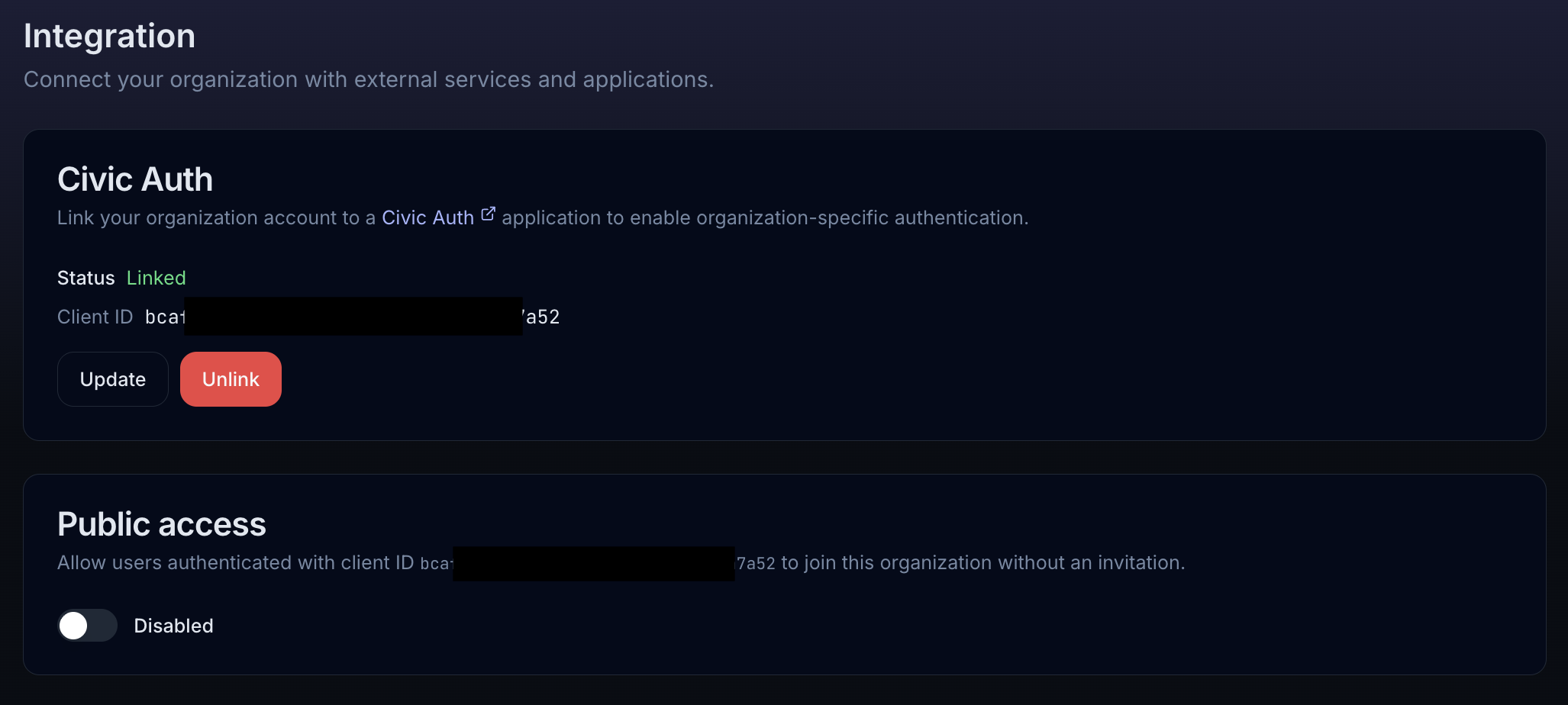
- Civic Auth — Link your organization to a Civic Auth application by entering your Client ID. Once linked, the status shows “Linked” along with the Client ID. You can update to a different Client ID or unlink at any time.
- Public access — Controls whether new users can join your organization automatically. By default, users must be invited (their access token must have both a matching email and Client ID). Enabling public access allows any user who authenticates with your Client ID to join automatically with an
END_USERrole.
The Integration page is only available for organization accounts and requires an Owner or Admin role.
2. Obtain Civic Auth tokens for your users
You have two options depending on your architecture:- Option A: Integrate Civic Auth directly
- Option B: Token Exchange
Best for: Applications that don’t have an existing identity provider.Integrate Civic Auth as your application’s authentication layer. Users sign in through Civic Auth, and your app receives access tokens that work directly with Nexus.This is the simplest path — the tokens Civic Auth issues are already valid for the Nexus MCP endpoint with no additional exchange needed.
Using the access token
Once you have a Civic access token, pass it in theAuthorization header when connecting to the Nexus MCP endpoint:
x-civic-profile header to scope requests:
Summary
| Step | What | Where |
|---|---|---|
| Register an app | Get a Client ID and Secret | auth.civic.com |
| Create an org | Set up your Nexus Organization | nexus.civic.com |
| Link Client ID to org | Associate your app with your org | Nexus Settings → Integration |
| Get tokens | Civic Auth directly or Token Exchange | See options above |
| Connect to Nexus | Authorization: Bearer <token> | https://nexus.civic.com/hub/mcp |